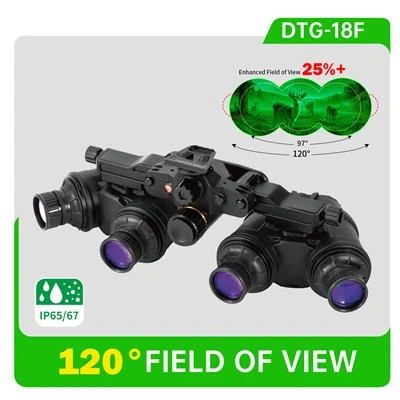
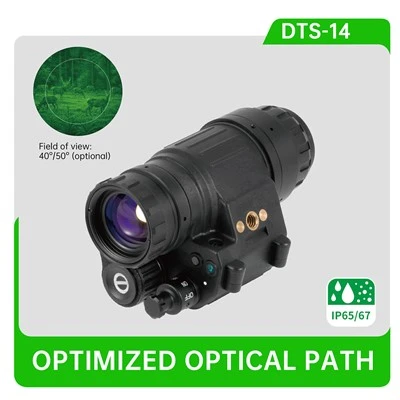
Hey there, if you’re reading this, you probably know how frustrating it is when a night vision clip-on system doesn’t perform the way you need it to—whether you’re out hunting after dark, scouting for work, or just enjoying some nocturnal hobby stuff. I’ve been in the game for years, working closely with everyone who uses our [Night Vision Sight Clip On Systems] to make sure they run as smoothly and clearly as possible, and today I wanna break down the actual, practical ways you can optimize its performance without needing a PhD in electronics. No fancy jargon, just real tips that I or our team have tested over and over.


First off, let’s start with the basics that people sleep on (pun totally intended). A clip-on night vision system—whether it’s our Gen 2+ model or any other—relies on two things: light gathering and power. Let’s talk about the light side first. The objective lens (the big front one that catches all the dark light) is the most important part here. A lot of folks don’t realize that smudges, dust, or even tiny water spots on that lens can kill your contrast and resolution way more than you think. I see this all the time: someone wipes it with their hoodie on a cold morning, leaves lint all over, and wonders why their target looks blurry 100 yards out. The fix? Use a lens cleaning pen specifically made for optical glass—no paper towels, no toilet paper, those will scratch it worse than a bad rub. And if you’re out in dusty areas, throw a lens cover in your pack and put it on when you’re not actively scanning. Even a few minutes of unprotected exposure to fine dirt can coat the lens enough to reduce light intake by 15% or more, and that’s a night and day difference in low light.
Then there’s the power supply. I can’t tell you how many times a hunter has come back to us saying their clip-on died mid-session, and it was just because they used cheap batteries. Night vision systems draw consistent power, especially when it’s cold outside, so using the wrong batteries is a quick way to tank performance. We always recommend lithium AA or AAA batteries—they hold their charge way better in temps below freezing, and they don’t leak like alkaline ones do. Pro tip: if you’re planning a long trip, bring two fully charged spares, and keep them in your pocket instead of your pack. Cold metal sucks power from batteries fast, so keeping them close to your body will keep that voltage steady, which keeps your night vision running bright, not flickering. Speaking of voltage, don’t mix old and new batteries either—even if they’re the same type, a used battery will drag down the whole set and make your system dim. It’s a tiny hassle, but worth it.
Now, let’s get into the settings. Most people just turn their clip-on on and leave it on auto, but tweaking those settings can make a huge difference. The gain control is the big one here. Gain is basically how much the system amplifies the tiny light it catches. Auto gain works okay, but if you’re in an area with really dark, open terrain, cranking gain up a little (but not too much) will make targets stand out more—though watch out for blooming, that’s when bright light (like a full moon or a distant campfire) washes out nearby stuff. On the flip side, if you’re in a wooded area with lots of undergrowth, turning gain down a touch will reduce that grainy static that makes it hard to pick up movement in the trees. For our [Gen 2+ Dayscope Clip On Systems], the gain dial is super easy to adjust on the fly, so you don’t have to fumble with buttons when you spot something moving. Another setting people sleep on is the brightness of the reticle. If you’re using the clip-on with a rifle scope, having the reticle too bright can blind you to nearby targets, but too dim and you can’t see it. I usually set mine to just bright enough that I can pick it up in the periphery of my vision—way more useful than cranking it to max.
Next up, mounting. This might sound simple, but if your clip-on isn’t mounted properly, all the other optimizations are useless. A lot of people just tighten the mount until it feels “secure,” but if it’s not aligned perfectly with your host scope, you’ll get vignetting (that dark ring around the edges of the image) or the reticle will be off. The rule here is: take your time when mounting, don’t rush it. Use a torque wrench if you have one—most mounts have a specific torque that keeps them tight without warping the scope or the clip-on’s body. Also, check the mount before every use. I’ve had a mount come loose mid-scout, and that’s not just bad performance—it’s dangerous if you’re trying to take a shot at night. If you’re using the system with different scopes, make sure the mount is compatible. Some clip-on systems only work with certain scope diameters, so double-check that before you buy, or you’ll end up dealing with shims that throw alignment off.
What about environmental factors? Night vision systems are sensitive to both hot and cold temps. If you’re coming from a warm truck to the cold outdoors, wait 10-15 minutes before turning your system on. That condensation can build up inside the lens housing, and if you turn it on right away, the heat from the system will make the condensation evaporate too fast, leaving streaks on the internal lenses that you can’t wipe. I learned that the hard way once—frosted up my Gen 2+ system in 20 degree weather, and it took an hour to clear. For hot weather, same thing: if you’ve been carrying it in a pack in the sun, let it acclimate before use too. Also, avoid looking at bright lights (like car headlights or a campfire) through the system for more than a second. Even though modern night vision has built-in protection, it’s not invincible—staring at a bright light for too long can damage the image intensifier tube, which will make the resolution and contrast go down over time. I always teach new users to glance away from bright lights quickly, same as you would with your naked eye.
Maintenance is another big one that’s often overlooked. You don’t have to take the system apart to clean it (in fact, don’t do that unless you know exactly what you’re doing), but a quick check every few uses goes a long way. Wipe the outside lens when it’s dirty, make sure the battery compartment is free of dust (use a small can of compressed air, held sideways so it doesn’t blow debris into the compartment), and if you notice the image getting grainy even in good light, check the battery contacts—sometimes corrosion builds up there and blocks power. We send a small maintenance kit with all our clip-on systems, but if you lost yours, just pick up a contact cleaner spray (the kind made for electronics) and use a cotton swab to gently clean the contacts. That alone can fix a lot of “performance issues” that people think are broken tubes.
Wait, let’s talk about image intensifier tubes specifically, because that’s the heart of any night vision clip-on. The tube generation matters, obviously—our Gen 2+ systems are a step up from the older Gen 1, but even with the best tube, wear and tear will affect it over time. To extend the life of the tube, avoid running the system at max gain for hours on end, especially in low light where you don’t need that much amplification. Also, don’t leave the system on when you’re not using it—even on standby, it’s drawing a little power, and constant amplification can shorten the tube’s lifespan. I’ve had customers use their Gen 2+ systems for 5+ years with minimal issues, just because they follow those simple rules.
Another thing: pairing the clip-on with the right host device. A lot of people buy a cheap rifle scope to pair with a high-end clip-on, and that wastes the clip-on’s performance. A good host scope should have clear optics that don’t add glare or distortion, so the clip-on’s image can shine through. We always recommend pairing our [Night Vision Sight Clip On Systems] with scopes that have at least a 30mm tube, because they’re more stable and reduce alignment issues. If you’re using a different host, shims can help adjust height and alignment, but make sure they’re the right thickness—too thick and you’ll get parallax, which makes targets look like they move when your eye shifts.
Now, let’s get to the stuff that’s less obvious. Parallax adjustment. A lot of clip-on systems have a parallax knob, but few people use it correctly. Parallax is when the reticle and the target are on different planes, so if you move your eye off center, the reticle shifts relative to the target, making it hard to aim accurately. To set parallax, aim at a target at your intended distance (say, 100 yards), adjust the parallax knob until the reticle stays aligned with the target no matter how you move your eye side to side. That tiny adjustment can make your shots way more accurate, especially at longer ranges at night. I’ve had hunters tell me this fixed their accuracy more than upgrading their clip-on tube ever did.
Also, avoid using the system in direct moonlight if you can. Wait, no—actually, moonlight is good, but direct sunlight? That’s a no-go, even with the protection. If you have to leave your system in the car during the day, don’t leave it on the dashboard where the sun hits it. The heat and UV radiation can damage the tube over time. Store it in a cool, dry place when you’re not using it—same with the batteries, remove them if you’re storing the system for more than a week, that way they won’t leak and damage the contacts.
Let’s wrap this up with a quick recap, because I know this is a lot. To optimize your night vision clip-on system: keep the lenses clean, use quality lithium batteries and store them properly, tweak gain and reticle settings for your environment, mount it tight and aligned correctly, acclimate it to temperature changes, do quick maintenance checks, care for the image intensifier tube by avoiding max gain and bright lights, adjust parallax, and store it right. These are all things we’ve tested on all our models, from our basic [Night Vision Sight Clip On Systems] to our high-performance Gen 2+ Dayscope Clip On Systems, and they make a way bigger difference than any fancy upgrade.
If you’re looking to get a new system, or want to chat about optimizing the one you already have, we’re here to help. Our team has been working with night vision gear for years, and we can hook you up with advice that fits your specific needs—whether you’re a hunter, a security professional, or just someone who loves night time adventures. Don’t hesitate to reach out to us to talk about your requirements, get help with settings, or learn more about which system is right for you. No sales pitch, just real advice from people who use this stuff every day.
References:
- Night Vision Devices: Principles and Applications, Richard Reynolds, CRC Press, 2000
- Optics for Hunters and Shooters, Bob Shell, Krause Publications, 2018
- Performance Optimization of Image Intensifier Tubes, Journal of Optical Engineering, Vol. 45, No. 6, 2006
- Battery Performance in Extreme Temperatures for Portable Electronics, Consumer Electronics Association Report, 2021