A faster thermal update can make a handheld view easier to follow during lawful civilian wildlife observation, especially when the guide pans across a landscape. Check what the quoted number measures. A camera can deliver new thermal frames at one rate while the eyepiece refreshes at another. A saved clip may have its own cadence. Judge the part the group actually needs rather than comparing the largest number on two sheets.
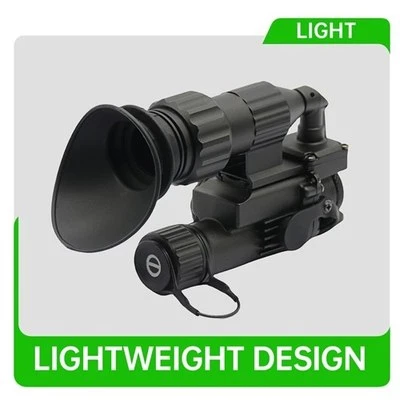
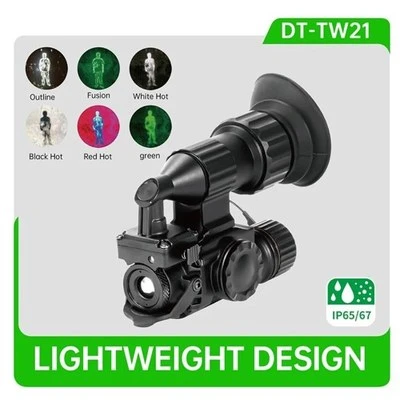
Detyl lists a compact high-resolution thermal monocular. Ask for the exact model variant and its documentation, then arrange a repeatable viewing exercise. Give more attention to a controlled live demonstration than a promotional recording if the observer will use the eyepiece. Set a lawful viewing location and keep the activity within site rules. An effective comparison does not require approaching or disturbing wild animals.
Compare live viewing and recorded outputCheck which figure refers to the camera, display or recording.
Detyl compact thermal monocular · Detyl product support and company overview
Find out which image is being refreshed
A thermal sensor supplies information, the device processes that information, and a display presents a view to the operator. Teledyne FLIR illustrates this distinction in its explanation of nominal 9 Hz and 60 Hz camera figures. When an eyepiece draws more often than the camera supplies new frames, the display can repeat a frame. Ask the manufacturer to identify which figure is documented, what operating mode it describes and whether there are separate figures for recorded output.
Saved clips pass through a separate part of the device or connected system. Playback, recording, transmission and compression can change the result seen later. A short video demonstrates what is in the file. It does not establish what a particular guide saw through the display as they moved the device. If the group reviews recordings for education, evaluate an original sample file as well as live handling. Note how the recording was captured and transferred.
Image continuity is one attribute. Field of view, focus, optics, contrast and the viewing conditions can also determine whether observers stay oriented. A guide may follow a known reference more easily with a wider field or different lens, even if both devices have the same published rate. Log which mode and lens you tested. Distinguish a visible heat pattern or a known reference from a conclusion about an unidentified animal.
Compare the samples from the same vantage point
Find a permitted, safe observation point with a few known landmarks. Ask one operator to compare a stationary view and a gradual sweep between those landmarks. Establish an approximate pace and the direction before switching devices. Keep the mode, viewing position and scene comparable as far as possible. Ask whether the observer can keep a chosen reference in view and recover orientation if they look away.
A second exercise can use a consenting colleague in a permitted area as a moving reference. The exercise is about continuity and ease of observation. Give the record basic context such as approximate distance, whether the reference was sometimes obscured and whether the scene changed. Plan it from a stationary position where the guide can stay aware of the area. Training a group on moving reference points is practical without involving actual animals or sensitive wildlife locations.

| Observation | Keep in the test log | What it can help establish |
|---|---|---|
| Still view | Mode, lens and known scene references | How the operator starts a comparison |
| Slow sweep | Direction and any issue staying oriented | Ease of following the scene |
| Known moving reference | Context, trial duration and what stayed visible | Live view continuity in the sample case |
| Saved file | Recording mode, origin and export method | Whether the captured view suits its intended use |
| Operator comments | The event and viewpoint behind each note | Why a feature mattered to the group |
Rerun the exercise if a noticeable difference occurs on a single pass. If a comparison depends on changing the zoom or another mode, record the change and use the same permitted test location. Make a separate note where one device cannot reproduce the same settings. A useful result can explain why views differed without attributing the difference to refresh rate alone.
Name what interrupts the view
Ask the vendor how the device indicates routine image correction or standby where applicable. Write down whether an observed pause occurred while looking through the eyepiece, on an external display or in a recording. Note whether normal viewing returned and what the operator observed just before the pause. Keep a separate description for what the supplier later confirms. A field observer may report a brief interruption without being able to say why it occurred.
For example, one guide may report that the view looked continuous during a left-to-right sweep until a closer object entered the scene. Another guide may say they lost their bearings on the same sweep but found the reference again quickly. Those observations suggest a follow-up question about orientation or view, even with no change in the product's nominal rate. Record the expected operating scene beside the result so buyers can decide whether the example matters.
If you receive a stored clip from the manufacturer, confirm its exact camera and mode and ask whether it was edited. Compare the file using the intended playback device if the output is important for training. A file that reports a particular playback rate may still contain repeating images. Keep a general video clip as an illustration if details about acquisition or export are missing.
Write down the differences a guide can use
For an organization with several guides, allow a regular operator and someone newer to the job to record separate observations. The practical difference could be holding a stable view, recognizing the visible controls or finding a known landmark again. If the two guides disagree, repeat the intended scenario while they can still explain why. Keep borrowed settings, glasses use where relevant and signs of operator discomfort in scope only as needed for the purchasing question.
Ask the person planning normal outings to name which tasks matter most. A quiet stationary wildlife viewing point places different demands on the group from regular movement between designated lookout areas. Accessories and battery handling may affect the quote separately. Do not use a favorable test of live cadence as proof that the carrying and operating arrangement will suit a full outing. Record the practical concerns separately so one result cannot accidentally release every other requirement.
Use a short note to explain which sample becomes the reference for receiving. Record model, lens, relevant mode and firmware if available. Ask how a later replacement will be identified and which sample checks a receiving team can repeat. The staff should be able to demonstrate the viewing exercise without recreating a wildlife event. Avoid retaining exact details of sensitive locations if a generic training site will answer the equipment question.
Close the purchase comparison with the intended use
Set a clear boundary for acceptance. A buyer can approve a handheld unit for a specific type of civil viewing while asking for additional evidence about recorded output or another lens. Write which conditions the sample covered and which modes, features or accessories still need confirmation. Keep the expected use and the relevant product information on the same purchase worksheet.
Before requesting several units, ask the supplier to identify any differences between the demo and the offered version. A change in view or handling can affect the group even where the model name looks unchanged. Discuss whether the first delivery will include a chance to confirm a representative unit. When a training plan turns over between volunteers, give them the purchase record and a simple description of how to report problems with the live view.
Use a controlled comparison if two guides disagree about a sample. Leave the setting, references and lens fixed and change just one mode where the equipment permits. Compare whether either operator can complete a short sweep without losing the intended reference. A person with more experience may rely on landmarks differently from a first-time volunteer. Ask both what caused the interruption rather than forcing a single shared rating.
Ask the group to nominate which two conditions it wants a replacement unit to reproduce. A familiar stationary reference and a short sweep from the same permitted position can often be repeated without a complex field trial. Put the approved lens and mode beside the result. If a later recorded clip is important, retain a separate acceptance note for digital output. An observed pause in a clip should not be mistaken for a fault in the eyepiece unless the evidence connects them.
To compare refresh rate without a moving guide, include a short second observation from the same safe location. Record the exact lens and the display mode used, then describe what happened when the reference crossed the scene. Keep the live observation in the log even when a later recording looks smoother. This lets a buyer ask about the specific difference and get a response that applies to the intended sample.
Wildlife viewing sample questions
Does higher display refresh always mean new thermal frames?
No. The display can repeat frames that arrive at a lower rate. Ask the supplier to identify the camera and display figures separately.
Can a sample video demonstrate the live eyepiece?
It can illustrate the recorded output. Check the actual eyepiece for the expected motion and viewing tasks.
Will increasing refresh make a distant animal identifiable?
Scene, optics, detail and context all matter. A smoother sweep alone cannot establish identity.
What should both demonstrations share?
Use the same vantage point, known references and operator where practical. Record optics, mode and any unavoidable differences.
Should we log a pause in both outputs?
Record the paths where it occurred and whether it happened in the live view, recording or both.
What should a guide ask Detyl to confirm?
Request the variant, lens, nominal thermal and display rates where documented, relevant modes and recording scope.
Request the exact viewing configuration
Send Detyl the lawful civilian viewing scenario and the live or recorded use you need to evaluate. Ask for model-specific documentation and a representative demonstration.