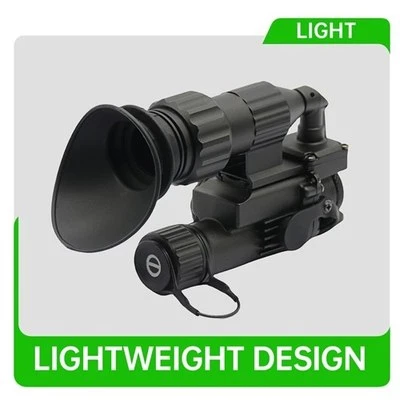
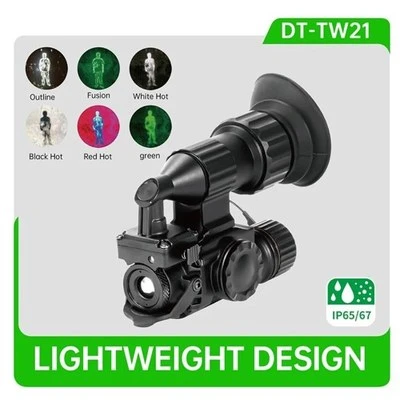
Before handing a thermal viewer to the next guide, inspect its housing and the accessible optical surfaces under the conditions specified for that device. Give the receiver a short record of the unit, observed condition and any action already authorized. If you see a new mark, moisture, looseness or an unexplained image problem, record it and route it to the responsible owner instead of handing it over as ready.
A thermal viewer pre-session condition check has three jobs: verify identity and normal condition, make an earlier concern visible and confirm who can release the device for lawful nature observation. Detyl lists a compact thermal monocular with a handheld configuration. Use the instructions for the exact sample and approved accessories, and ask the supplier for written care guidance where needed. The condition check supports tour preparation. It does not inspect internal optics or authorize repairs.
Read the last equipment statusCheck the exact unit, visible condition and who owns any unresolved issue.
Detyl compact thermal monocular · Detyl product support and company overview
Start before the viewer leaves its case
Look up the unit and the last recorded state. Match the case and accessories the operator is expected to use. If a previous shift opened a service report, check its status with the appropriate owner. Inspect under approved conditions with ordinary light adequate for seeing the outer surfaces. Ask the person responsible for the equipment what can be observed without removing parts or introducing unnecessary handling. Where moving equipment from another environment can affect conditions, follow the applicable instructions before drawing a conclusion.
Check the visible housing, cover and accepted retention arrangement for obvious differences from the established reference. A swapped cap or a different case could be cosmetic, but may affect whether the lens is protected during the ordinary route. Record location and observed condition without interpreting every mark as damage. If an approved instruction identifies a condition that requires a hold, apply the organization's established process and keep the unit out of normal issue pending review.
The buyer or operator should know what a proper handover looks like on a routine day. Give staff a unit identifier and simple access to the current manual. Establish which items can be verified during a short inspection and which belong to scheduled service. A visually clean unit still needs the organization to follow its authorized care, startup and operating requirements. Make the distinction visible in the records so "looked fine" is never used as a substitute for an outstanding service decision.
Look at lens and housing as separate observations
| Area | What an authorized routine check can record | Example status to route |
|---|---|---|
| Lens exterior | Visible condition and location of a deposit or mark without touching sensitive areas | New observation with review request |
| Cover and housing | Visible fit, damage or changes relative to the agreed reference | Accessory or unit review by the owner |
| Retention and carry items | Exact supplied or accepted parts and apparent condition | Missing item or checked under instructions |
| Viewing check | Authorized baseline and any observable difference | Repeatable problem sent to service |
| Handover | Time, unit ID, responsible person and actual status | Available within scope, held or awaiting decision |
Avoid cleaning a coated optical surface using an assumed household technique. Follow the official instructions for the exact device, and get authorized advice if an issue is outside the planned care. Manufacturers such as FLIR publish separate guidance for particular infrared camera optics, which illustrates why coatings and cleaning methods need product-specific instructions. That guidance does not establish a procedure for a Detyl unit. Ask Detyl for the current documentation and service route for your equipment.
Describe a mark in words another guide can recognize
Report the point on the outer assembly or lens area, how it was noticed and whether the normal image looked different during a permitted check. Photograph visible conditions only where allowed and without recording visitor details. If an earlier file shows the same location, preserve both records and let the owner determine whether they are comparable. A reflection during inspection can be different from a physical mark that appears under the approved method.
Rehearse a handover when the result is unresolved
Imagine a guide returns a unit and reports a hazy view. The next guide sees a mark on the housing and has no verified evidence that the two observations are connected. Record the hazy view and the housing observation independently. Ask who can review the unit and arrange an authorized comparison. Give the next guide an approved alternative for the session, if available, without trying to clear an uncertain condition through extra handling.
If a visible issue is checked against a reference image, identify which device, exact mode and permitted scene were used. A comparison under different background or viewing conditions may be inconclusive. Keep the equipment check separate from any observations about wildlife. The operator can explain that the device is awaiting review without sharing a guess about the source of the image difference. A reliable handover helps the tour lead plan, particularly when the usual equipment contact is absent.
Keep a short set of descriptions for staff. "Cap missing," "mark near the outer rim," and "image concern awaiting review" are useful when true. Avoid a status that implies a completed inspection if only the previous operator's notes were seen. Give the next person the date, time and authority to contact. If a resolved condition returns, open or cross-link a new observation using the correct unit rather than overwriting the earlier service discussion.
Ask the supplier for records you can inherit
During sample evaluation, ask the supplier which accessories and documents will accompany the exact handheld configuration. Request the external care and storage guidance and the route for an authorized service question. Enterprise or tour buyers often loan devices across shifts, so request identifications that can still be found after unpacking. The operating team can verify the reporting flow with an uncommissioned sample and agreed instructions.

Keep a change visible when inventory is shared
A replacement lens cap or carry item may look familiar and still need model-specific confirmation. Ask the equipment owner and supplier for the exact reference before treating it as a valid option. Record a temporary loan or approved replacement with its status. If the buyer changes the offered bundle, update the instruction and current assignment through the organization. Keep reception and condition information alongside the correct model.
For a group operating more than one viewing location, agree which staff records are shared and who can review a hold. Ask guides what evidence they can reasonably supply without dropping other duties. A printed card or short form can name the equipment, visible check and owner, while service keeps detailed reports separately. Review after a few shifts to see where the process fails. If a unit reached the wrong group despite a hold, improve identification and handover before expanding the purchase. If the next delivery differs from the sample, ask the supplier and technical owner which care and reporting instructions apply.
Give the next guide a status they can act on
The operator can use one equipment card with identity, last approved release, current condition and a named point of contact. Fit it to the handover time actually available between sessions. Let an employee read the short status aloud and point to the action they would take. If the record makes them open three unfamiliar documents for a basic decision, ask the equipment owner to bring the necessary reference to the point of issue without exposing sensitive service information.
For an illustrative shift, a previous operator checked the case and cap, while a later authorized observation raised a concern about moisture or an unexpected image. The card should preserve which evidence is newer and which concerns remain unresolved. Assign someone to handle the next inquiry. Do not give two notes the same weight just because one was printed and one arrived electronically. The facility's authorized workflow should tell guides which release is current.
Tell the buyer what failure of the handover looks like
Consider what you would be unable to verify if a new unit arrived with a different case or other approved accessory. Ask the supplier to show where identifiers will be readable on the actual offered configuration. Discuss access to the current care documentation and authorized support rather than guessing from product photography. A buyer can record whether a new viewer is suited to the operator's routine even while unrelated capacity or warranty questions remain open.
After the first few sessions, let guides suggest additions based on real handovers. Restrict them to observable facts and the equipment they actually used. If a mark cannot be confirmed in the stated conditions, preserve the uncertainty and route the inquiry to the owner. Give the next evaluator a clear scope when using this record for another model or site. The goal is a repeatable condition check and ownership decision, not a more complicated description of every visible part.
Questions between observation sessions
Should the routine check include opening the viewer?
Use only the external and operating checks allowed by the exact documentation and organization. Refer internal work or unauthorized access to the proper service owner.
What if the lens looks slightly cloudy?
Record the observable condition and relevant surroundings. Follow approved instructions and refer unresolved changes to the equipment owner before normal issue.
Can staff use a general glass cleaner?
Confirm the instructions for the optical surface and device. Do not substitute an unverified method or material for an approved one.
What belongs in a pre-session record?
Include unit identity, visible condition, associated accessory issue, authorized check and current assignment or service status. Note any observation that still needs review.
Can a normal image release a physically compromised unit?
Let the equipment owner apply the approved checks and disposition. An image observation does not resolve a separate housing, optical or retention concern by itself.
What should buyers ask Detyl to supply?
Ask for the exact handheld configuration, current documents, included accessories and the relevant service route. Describe your lawful civil observation and shared equipment workflow.
Request current care and handover information
Share the intended handheld configuration and approved use with Detyl. Ask for fitting accessories, exact instructions and the appropriate support contact.