What is the user interface of a thermal imaging camera?
In the diverse realm of thermal imaging technology, the user interface (UI) of a thermal imaging camera serves as the pivotal link between the user and the rich world of infrared detection. As a seasoned thermal imaging supplier, I've witnessed firsthand how the design and functionality of the UI can significantly impact the overall user experience and the effectiveness of the camera's applications.
The user interface of a thermal imaging camera encompasses all the elements that allow users to interact with the device, including the physical controls, the on - screen display, and any software - based interfaces. A well - designed UI simplifies operation, enhances the user's ability to interpret thermal data, and ultimately maximizes the utility of the camera in various scenarios.
Physical controls are the tangible way users initiate actions on a thermal imaging camera. They typically include buttons, knobs, or touchpads. These controls are strategically placed on the camera body for easy access. For example, a power button is usually prominently located to turn the device on and off quickly. Other buttons may be dedicated to functions such as adjusting the gain, which controls the sensitivity of the camera to temperature differences, or changing the color palette of the thermal image. A knob might be used for zooming in and out, allowing users to focus on specific areas of interest. The layout of these physical controls should be intuitive, enabling users to operate the camera even in challenging conditions, such as low - light environments or when wearing gloves.


The on - screen display is the visual window into the thermal world. It presents the thermal image, along with various information and settings. The thermal image itself is the core of the display. High - quality displays show clear, sharp images with accurate temperature representation. Color mapping is a crucial feature of the on - screen display. Different color palettes can be used to represent temperature variations, such as the commonly used rainbow palette, which assigns warm colors to hotter areas and cool colors to colder ones. This color mapping helps users quickly identify temperature differences and highlight potential issues.
In addition to the thermal image, the on - screen display may show real - time temperature values of selected points or areas. Users can use the camera's controls to move a cursor or mark a region of interest, and the display will show the corresponding temperature. Some advanced cameras also offer features like temperature alarms. If the temperature in a monitored area exceeds or falls below a predefined threshold, an on - screen alert will be triggered, along with an optional audible signal.
Another important aspect of the on - screen display is the menu system. The menu provides access to a wide range of settings and functions. Users can adjust parameters such as brightness, contrast, and focus in the menu. It also allows for calibration of the camera, which is essential for accurate temperature measurement. The menu should be well - organized and easy to navigate, with clear labels and intuitive icons. For example, a hierarchical menu structure can group related settings together, making it easier for users to find what they need.
Software - based interfaces have become increasingly important in modern thermal imaging cameras. Many cameras come with companion software that can be installed on a computer, tablet, or smartphone. This software allows users to transfer thermal images and data from the camera to the device for further analysis. It provides more advanced features for image processing, such as image enhancement, temperature analysis, and reporting. For example, users can use the software to draw profiles across the thermal image to analyze the temperature distribution along a specific line. They can also generate detailed reports with images, temperature data, and annotations, which are useful for documentation and sharing.
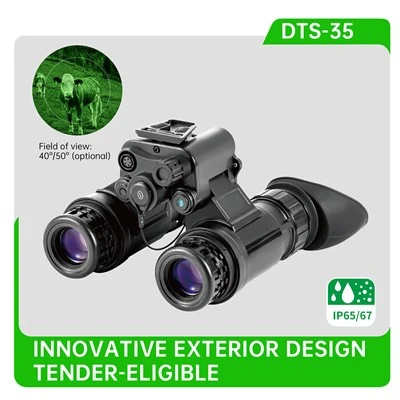
Different types of thermal imaging cameras may have varying user interfaces based on their intended applications. For instance, thermal goggles are often used in military and security applications where quick and intuitive operation is essential. Our Thermal Goggles with Long Range Detection are designed with a simple yet effective UI. The controls are optimized for use in the field, allowing users to quickly adjust settings like magnification and gain without distraction. The on - screen display provides a clear and uncluttered view of the thermal scene, with relevant information such as battery status and temperature scale easily visible.
Thermal monoculars are popular for wildlife observation and outdoor activities. Our Thermal Monoculars with Clear Imaging feature a user - friendly interface that focuses on providing a sharp and detailed thermal image. The controls are designed for one - handed operation, and the on - screen menu allows users to adjust settings like color palette and image quality to suit different viewing conditions.
Binoculars with thermal imaging capabilities are commonly used in security, surveillance, and search - and - rescue operations. Our 640×512 Resolution Thermal Imaging Binocular offers a sophisticated UI that combines high - resolution imaging with advanced control options. The on - screen display provides comprehensive information, including a digital compass and GPS coordinates, which are invaluable in navigation and location - based operations.
Compact thermal monoculars are often used as clip - on systems for existing optical devices. Our Compact Thermal Monocular with High Resolution has a streamlined UI that emphasizes ease of installation and integration. The controls are simple and intuitive, allowing users to quickly switch between different operating modes and adjust the thermal image to match the optical view.
For specialized security operations, our Thermal Fusion Binocular For Security Operations combines thermal and visible light imaging. The UI is designed to manage the fusion of these two types of images effectively. Users can control the level of fusion, adjust the focus of each image source, and access additional security - specific features such as motion detection and image recording.
In conclusion, the user interface of a thermal imaging camera is a critical component that determines the usability and effectiveness of the device. A well - designed UI should be intuitive, easy to operate, and provide users with the necessary information and control options. Whether it's for military, security, wildlife observation, or industrial applications, the right UI can make a significant difference in how users interact with and benefit from thermal imaging technology.
If you're interested in exploring our range of thermal imaging products or have any questions about user interfaces and their suitability for your specific needs, we'd be delighted to engage in a procurement discussion. Our team of experts is ready to assist you in finding the perfect thermal imaging solution for your requirements.
References
- "Thermal Imaging Handbook: Fundamentals, Research and Applications" by John I. Baumbach
- "Infrared and Electro - Optical Systems Handbook", Volume 3: Thermal Imaging Systems. Edited by Philip D. LeVan.